Thursday, July 15, 2010

IPTC-PLUS Toolkit released by IPTC & PLUS


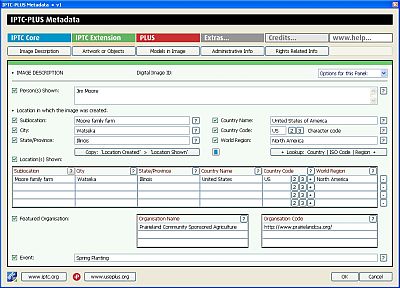
The International Press Telecommunications Council (IPTC) and the Picture Licensing Univeral System (PLUS) have jointly developed a plug-in metadata panel for use in Adobe Bridge (CS3 or higher) which allow users to read/write the full set of fields included in the IPTC Core, IPTC Extension and the PLUS metadata schemas.

Metadata are considered as being critical to the photo business as they are used for searching pictures and to indicate the rights and terms of their use. The tools are, as all IPTC and PLUS applications, free of charge and can be downloaded from the IPTC or PLUS websites.

The included tools help photographers, image libraries and photo agencies to store detailed descriptions of their content and data relevant for managing image copyrights directly in the images.

"IPTC was instrumental in the development of the PLUS Standards, and our active collaboration continues today with the release of the IPTC-PLUS Metadata Panels, allowing image creators, distributors and users to benefit from the full scope of image metadata, all from within a single tool," said Jeff Sedlik, President and CEO of the PLUS Coalition.

The release of this free IPTC-PLUS Toolkit means that anyone with compatible versions of Adobe Bridge will now have the means to easily embed the full set of IPTC fields as well PLUS metadata to digital images. Power users will love the fact that with this IPTC-PLUS Metadata panel you can now export out a full set of metadata fields into a Tab Separated Value (TSV) plain text file. In addition, you can modify that data and then import the resulting information through the same Metadata panel so that it is embedded directly into the file.

Also included in the download are comprehensive user guidelines, mapping charts and example images. The user guidelines define each of the fields available in the Adobe CS5 File Info dialogue, as well as those in the IPTC-PLUS Metadata Panels (IPTC Core, IPTC Extension and PLUS Schemas are covered). The field mapping charts will help those that are used to working with other image metadata tools, and the provided images are preloaded with embedded photo metatadata so you can test if the value of a field is shown in the expected field in the user interface.

Read more and download the IPTC-PLUS Toolkit -- the download file is in the olivey-green side bar at the right (a 9.1 mb download).

Wednesday, February 24, 2010

Having Metadata Export Issues with Aperture 3?

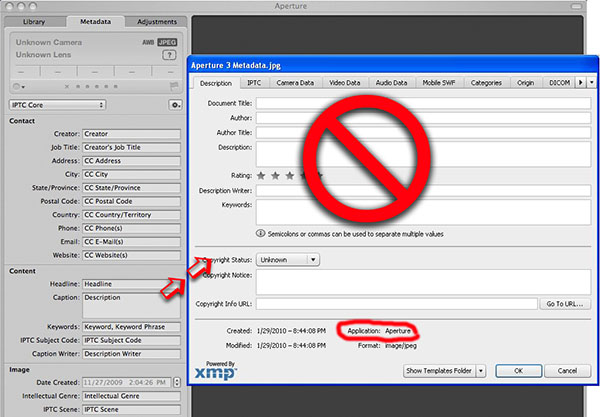
Photographers need to be aware that there are some real concerns regarding how Apple Aperture 3, is writing metadata; especially when these files are viewed by other applications in an imaging workflow.

Those using Aperture to write metadata to files that will be used with other programs at some point in their workflow need to do some testing. Those sharing images with others directly, or via the Internet may find that even basic fields like the Caption/Description and Keyword fields are not visible after exporting from Aperture 3.

You need to understand what is happening if you do additional work in Photoshop or Lightroom, and then archive your images using other programs. Otherwise you risk having some or all of your metadata disappear. This is because other programs may not see (recognize) the information you are adding to your images with Aperture 3. In addition, if you are importing images that have been worked on in other programs, some of that metadata may not be recognized or stored within Aperture.

You should really be concerned if you are fully using the various metadata fields, such as the Rights Usage Terms, Location fields, or geo-tagging your images, as many of these fields (and others), are not showing up in Photoshop, Adobe Bridge, Photo Mechanic, or Expression Media, after being exported from Aperture 3.

Visit the "Apple Aperture 3 Metadata Issues" article to find out more, including access to a chart that maps out what is seen and what is lost or hidden in JPEG, TIFF, DNG and proprietary NEF files.

Thursday, December 3, 2009

Do Social Media Websites Preserve Photo Metadata?


Do the social media websites or other image sharing services you use preserve your embedded photo metadata after upload? The members of the Controlled Vocabulary forum are attempting to answer that question by conducting a survey of the various services to find out.

Most readers of this blog know what we mean when we talk about photo metadata, such as the photographers name, copyright notice, captions, and keywords that can be embedded into image files. It takes effort and time to add this to each digital file, but does provide a way for those wishing to use the file to contact the owner, or know what is going on in the image.

It seems hard to imagine that simply by uploading an image to a website that all this work could be undone. However, from reviewing the preliminary results of the survey it appears that many services are doing just that.

If you don't find your favorite service in the list of preliminary results, there are instructions on the Controlled Vocabulary Survey regarding the Preservation of Photo Metadata by Social Media Websites web page if you want to help out with the survey. You can download the testbed file seen here, and use it, or test with your own images. Full instructions on using a simple online tool to view the metadata after upload are included. What you should be seeing in the image is something that includes IPTC, XMP, and Exif metadata as in the testbed image on the site. However the image that was uploaded to the Blogspot platform to accompany this post has had all of it's metadata removed.

It appears that even Google has left room for improvement.

Saturday, September 5, 2009

A Big Game Safari of a Different Sort


In a post titled "Tracking the Mac OS X Snow Leopard Photographer" on the Photo District News (PDN) blog, Daryl Lang details the steps he took to track down the origin of the photo of the big kitty on the cover of the new Apple OS X release.

In brief they were:

Step one: Poke around on the Internet.
Step two: Tineye.
Step three: Twitter.
Step four: Ask Apple.
Step five: PACA OrphanSearch.

David Sanger points out in a reply, the obvious step they missed -- checking to see if there was any metadata in the image itself, since there is a version of the cover image distributed with the new OS. In this particular instance a search would have also resulted in a "fail" as well. However, anyone that followed the results of our SAA "Meta Survey" of stock image distributors, would know that the image which Apple licensed from Corbis would have had this embedded information when it was licensed. So the real question is, at what step in the process was it removed and why?

Enquiring minds want to know and absent any answers, the hunt will have to continue.

Monday, July 27, 2009

Riecks named Pioneer of Digital Preservation


David Riecks, project leader for the Stock Artists Alliance Photo Metadata Project is the most recently named Library of Congress "Pioneer of Digital Preservation." The award reflects his work with photo metadata standards through efforts such as the IPTC Photo Metadata Working Group, and the Stock Artists Alliance PhotoMetadata.org Web site.

This Library of Congress program has only existed since 2000. The relatively new field of digital-information management is thus reliant on individuals and organizations that are willing to embark on cutting-edge programs that will lead others to follow their examples.

The profiles of these digital preservation pioneers feature how each individual's or organization's work enriches the work that all libraries and other repositories are doing to collect and preserve our digital heritage. You can view the complete list of digital preservation pioneers for some other interesting stories.

Friday, June 19, 2009

Get yourself to getMETAsmart!


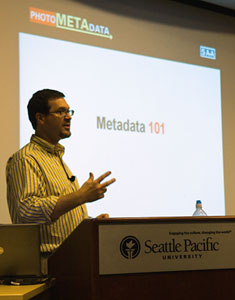
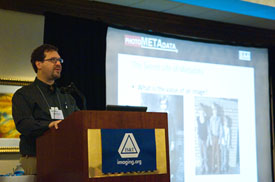
The getMETAsmart tour is well underway. In the past month, David Riecks has traveled to Dallas, San Antonio, Seattle, San Francisco and Los Angeles. Space is still available for this series of free evening seminars. Upcoming stops include New York City (June 22nd) and Washington DC (June 25), as well as Chicago, Atlanta, and Tucson in the upcoming months.

You will learn how using standard metadata can help protect your copyrights, support your licensing efforts, smooth your workflow, and help you manage ever-expanding digital archives. There have been a few reports about the getMETAsmart program so check them out if you want to see what others have to say, and be sure to sign up today.

Thursday, May 21, 2009

The Secret Life of Photo Metadata

David Riecks presented a key paper on photographic metadata May 7 at at the Archiving 2009 conference in Crystal City, Va. Riecks produced and shared the paper - titled "The Lifecycle of Embedded Image Metadata within Digital Photographs: Challenges and Best Practices (or The Secret Life of Photo Metadata)" - for the Stock Artists Alliance under the group's award from the Library of Congress' Preserving Creative America, National Digital Information Infrastructure Preservation Project. This year's Archiving conference drew about 150 attendees from some dozen countries. For details on the conference visit the Imaging Science and Technology website.

Riecks focused on how museums and libraries can use text information many professional photographers embed in their digital images, much as researchers use handwritten notes on the backs of prints.
This information can speed cultural heritage institutions' efforts to make those same images (once they become part of their collection) available to patrons in a digital format.
For details on the Stock Artists Alliance Photo Metadata Project visit PhotoMetadata.org.